Performant & clean
Built in Rust with GTK4 & libadwaita. Instant startup, buttery scrolling, and an interface that stays out of your way.

Veem is now Vireo — new name, new icon, same app. What changed →
Vireo is a clean, fast, GNOME-native email client with a calm three-pane layout, unified inbox, and support for OAuth accounts. Fast to open, effortless to read, and private by default.
Thoughtful defaults, a native GNOME feel, and the features power users expect — without the bloat.
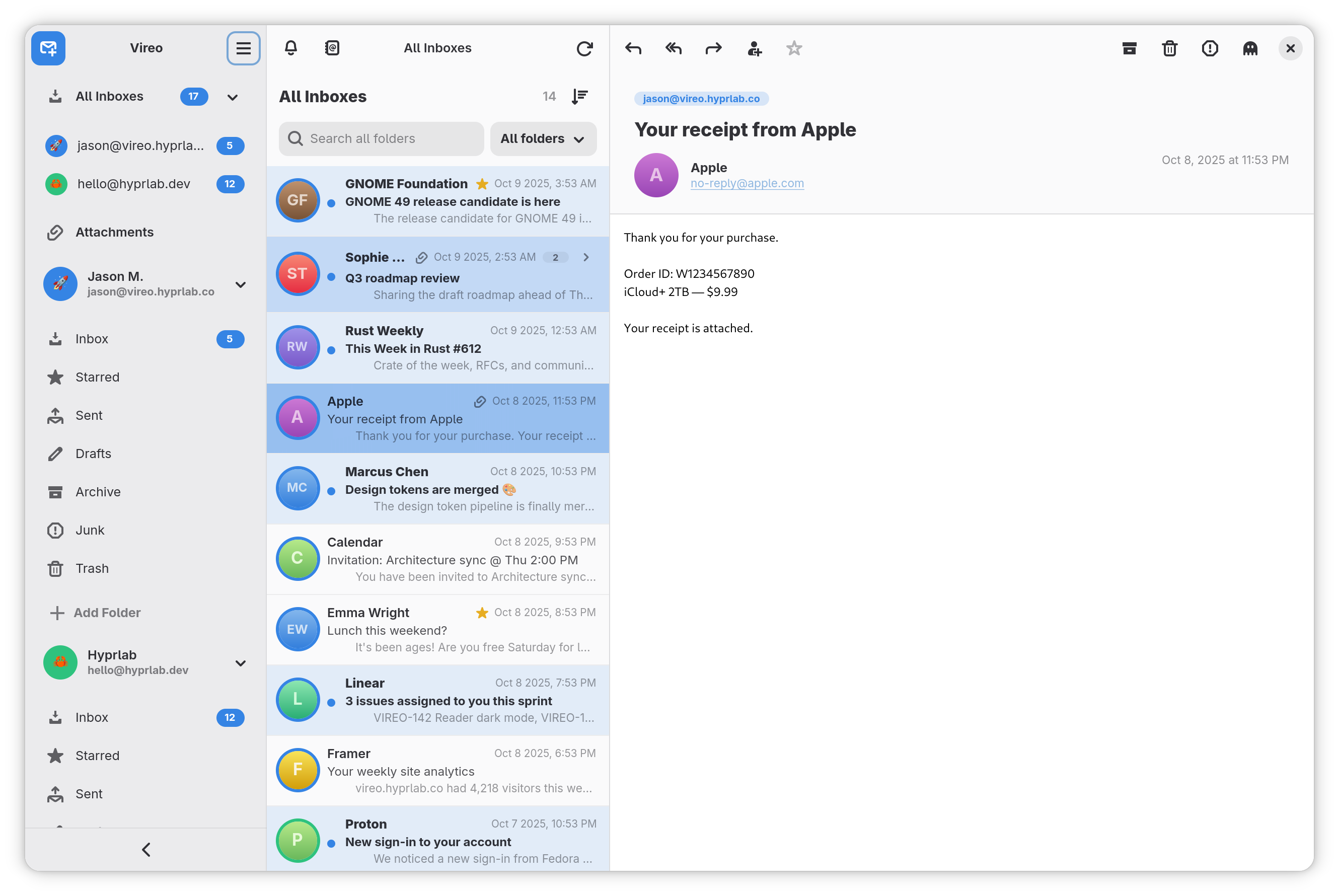
Built in Rust with GTK4 & libadwaita. Instant startup, buttery scrolling, and an interface that stays out of your way.
Hooks into the accounts you already set up in GNOME Settings — sign in once, and Vireo is ready to go.
Modern, token-based sign-in for Gmail and Outlook / Microsoft 365 — no app passwords, no fuss.
Real-time delivery over IMAP IDLE. New mail lands the moment it arrives — no polling, no waiting.
Give every account its own emoji and accent color so your inboxes are instantly recognizable at a glance.
Collapse the folder rail to focus on your mail, or expand it back out. The three-pane layout adapts to any width.
All of your accounts, one calm stream. See everything in a single place, or drill into any one account when you need to.
Conversations are grouped into tidy threads, so long back-and-forths read top to bottom without the clutter.
Follows your GNOME theme automatically — bright and cheery by day, easy on the eyes at night.
Integrates with GNOME Contacts and autocompletes recipients as you type — fully keyboard-navigable, so you can pick an address without ever leaving the keyboard.
Access a quick-action palette on any message in the list — archive, delete, mark read, and flag — without opening the message or hunting through a menu.
Optionally show sender avatars via Gravatar for a friendlier, more scannable list — and flip it off with a single toggle when you’d rather make no avatar lookups at all.
Browse every attachment across all your inboxes and folders in one visual grid — image thumbnails and colour-coded file icons — with a full-size preview and a jump straight to the source message.
Privacy-first
Vireo is built to respect you. No accounts to create with us, no data harvested, nothing phoning home. What happens in your inbox stays on your machine.
No analytics, no tracking, no “anonymous usage data.” None.
Tracking pixels and remote images are blocked by default, with a per-message “load” banner and a per-sender allowlist.
Passwords and tokens live in the OS secret service — never in plaintext on disk.
Vireo is released under the GNU AGPLv3.
Most of Vireo's code is written with Anthropic's Claude — directed, reviewed and tested by a human maintainer who signs off on every release. The artwork is human-made. And the app itself contains no AI: no AI features, no requests to AI services, and your mail never leaves your machine. Read the full AI notice →
Guides, setup, and reference — coming soon.
Install it, connect your accounts, and enjoy a calmer inbox.
Recommended: working GPU drivers (OpenGL / Mesa), ~4 GB RAM, and a GNOME-style desktop — though it runs fine on KDE and others. Uses ~1.1 GB for the shared GNOME runtime (reused across your Flatpak apps) plus ~13 MB for Vireo. Google sign-in and contact autocomplete use GNOME Online Accounts and Contacts when available.
Fedora, RHEL, and their relatives (Rocky, Alma, CentOS Stream, Nobara, Silverblue…) ship GNOME, the GNOME Keyring, and Flatpak with Flathub already enabled. There’s nothing to set up — passwords are remembered. Just install Vireo:
flatpak install --from https://vireo.hyprlab.co/flatpak/co.hyprlab.Vireo.flatpakref
The Fedora KDE (Plasma) spin ships Flatpak with Flathub enabled and uses KWallet as its Secret Service keyring, so your account password is remembered with no extra setup. Just install Vireo:
flatpak install --from https://vireo.hyprlab.co/flatpak/co.hyprlab.Vireo.flatpakref
Ubuntu doesn’t enable Flatpak or Flathub by default (its App Center is Snap-based), so add Flatpak support and GNOME Software’s Flatpak backend first. You only do this once.
sudo apt install flatpak gnome-software-plugin-flatpak
flatpak remote-add --if-not-exists flathub https://flathub.org/repo/flathub.flatpakrepo
flatpak install --from https://vireo.hyprlab.co/flatpak/co.hyprlab.Vireo.flatpakref
Ubuntu already includes the GNOME Keyring, so your account password is remembered automatically after that.
Linux Mint already includes Flatpak and Flathub, so Vireo installs out of the box — click Install Vireo above, or run:
flatpak install --from https://vireo.hyprlab.co/flatpak/co.hyprlab.Vireo.flatpakref
Make passwords stick — and stop the login prompt
On Mint’s Cinnamon desktop the system keyring often needs a one-time setup, or Vireo can’t remember your password between launches. Vireo 1.3.7 and newer detect Mint and show this tip in-app the first time you add an account.
sudo apt install gnome-keyring seahorse
Zorin OS is GNOME-based and ships Flatpak with Flathub and the GNOME Keyring already configured. Vireo installs and runs with no extra setup — passwords are remembered. Just install it:
flatpak install --from https://vireo.hyprlab.co/flatpak/co.hyprlab.Vireo.flatpakref
Found a bug or have a feature idea? The best way to reach the project is to open an issue on GitHub. Please search existing issues first, then include your Vireo version, your GNOME version and distro, and the steps to reproduce.
Vireo is free and open source. If it makes your inbox a little calmer, you can support its development:
Vireo is distributed as a Flatpak — the standard, safe way to install apps on Linux. It works on every distro. Pick whichever way is easiest.
Click below to get Vireo’s install file (a small .flatpakref).
Then open the downloaded file — double-click it, or click it
in your browser’s downloads bar. Your app store (GNOME Software, KDE Discover,
and most others) takes over and installs Vireo for you.
First time using Flatpak? You may need to set it up for your distro first — a one-time step that takes about a minute. If double-clicking the file doesn’t open your app store, use the terminal method below instead.
flatpak install --from https://vireo.hyprlab.co/flatpak/co.hyprlab.Vireo.flatpakref
Press Enter, then type y when it asks you to confirm.
flatpak run co.hyprlab.Vireo.